Simple Debug Info Panel (simple-debug-info-panel) free WordPress plugin
Free Plugin12 websites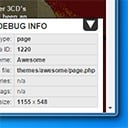
Summary
Simple Debug Info Panel for WordPress will enable you to instantly see some “under-the-hood” debugging info for your site. With one click (or none at all), you can see which template is being used, what the post/page ID is, the current screen/viewport size, any categories a post is assigned to, and some more.
Every item’s visibility can be turned on or off, so you have complete control over what will be shown in the infobox.
Features
- Shows template information: see which template is being used for any page you’re looking at.
- Shows post/page ID: gives you the internal WordPress ID of the current post/page.
- Categories/tags: shows relevant categories and tags of the post/page (if they are not displayed on the page itself).
- Screensize indicator: shows the viewport size, updates in real time (so you can figure out why styles within a certain media query are applied or not).
- Turn on/off which information you want to see: you can choose whatever you want the infobox to show.
- Positioning of box: choose placement of the box from 4 options (top left, top right, bottom left, bottom right)
- Default shows or hides: choose whether infobox should be open or closed/minimized by default
- Admin Only-mode: make infobox only visible on the front end to users logged in with admin rights.
Author: Mark Senff
Plugin folder: simple-debug-info-panel