WP Featured Content and Slider (wp-featured-content-and-slider) free WordPress plugin

Explore Featured Content and Slider Pro Features | Bundle Deal
Many CMS site needs to display Featured Content/Featured services on website. “WP Featured Content and Slider” is a clean and easy-to-use features showcase management system for WordPress.
Display Featured Content/Featured services, features your product, company or services offers, and display them via a shortcode OR template code.
Now added Custom Post Type support where you can display custom post type content with this plugin.
Also work with Gutenberg shortcode block.
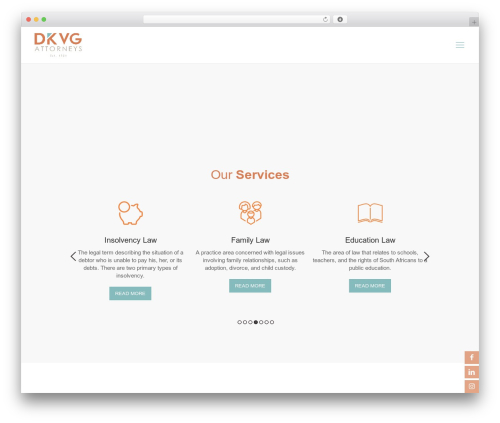
We have given 4 designs with 2 shortcode.
[featured-content] and [featured-content-slider]
Where you can display Featured Content in list view, in grid view and Featured Content Slider with responsive. You can also select design theme from “Featured Content -> Featured Content Designs”.
Shortcode Examples
1. Simple list view
[featured-content]

2. Grid View
[featured-content grid="2"]

3. Slider (per row one)
[featured-content-slider]

4. Slider (per row two)
[featured-content-slider slides_column="2"]
You can use Following parameters with shortcode
[featured-content]
- limit:
[featured-content limit=”5″] ( ie Display 5 featured content on your website ) - Design:
[featured-content design=”design-1″] ( ie Select design for featured content. Designs are design-1, design-2, design-3) - post_type:
[featured-content post_type=”post”] ( ie Select Post type for featured content. You can select post type: post, page, any custom post type) - Taxonomy:
[featured-content taxonomy=”category”] (Enter registered custom taxonomy name with respective to post type. To use with category wise for custom taxonomy.) - cat_id:
[featured-content cat_id=”category_id”] ( ie Display featured content categories wise) - grid:
[featured-content grid=”2″] ( ie Display featured content in grid view) - fa_icon_color:
[featured-content fa_icon_color=”#000000″] ( ie Change the color of Font Awesome Icon – If added insted of featured image) - image_style:
[featured-content image_style=”square”] ( ie Image style “square” OR “circle”) - display_read_more:
[featured-content display_read_more=”true”] ( ie Display Read More Button OR Not. Values are “true” and “false”) - content_words_limit:
[featured-content content_words_limit=”50″] ( ie Limit the words limit in the content section.) - show_content:
[featured-content show_content=”true”] ( ie show short content or not. By default value is “true”. Values are “true” and “false”) - extra_class:
[featured-content extra_class=””] ( You can add extra class here.)
You can use Following parameters with shortcode
[featured-content-slider]
- Display Number of Featured content at time
[featured-content-slider slides_column=”2″] (Display no of columns in featured content ) - Number of featured content slides at a time:
[featured-content-slider slides_scroll=”2″] (Controls number of featured content rotate at a time) - Pagination and arrows:
[featured-content-slider dots=”false” arrows=”false”] - Autoplay and Autoplay Interval:
[featured-content-slider autoplay=”true” autoplay_interval=”100″] - Slide Speed:
[featured-content-slider speed=”3000″] - limit:
[featured-content-slider limit=”5″] ( ie Display 5 featured content on your website ) - Design:
[featured-content-slider design=”design-1″] ( ie Select design for featured content. Designs are design-1, design-2, design-3) - post_type:
[featured-content-slider post_type=”featured_post”] ( ie Select Post type for featured content. You can select post type: post, page, any custom post type) - Taxonomy:
[featured-content-slider taxonomy=”category”] (Enter registered custom taxonomy name with respective to post type. To use with category wise for custom taxonomy.) - cat_id:
[featured-content-slider cat_id=”category_id”] ( ie Display featured content categories wise) - fa_icon_color:
[featured-content-slider fa_icon_color=”#000000″] ( ie Change the color of Font Awesome Icon – If added insted of featured image) - image_style:
[featured-content-slider image_style=”square”] ( ie Image style “square” OR “circle”) - display_read_more:
[featured-content-slider display_read_more=”true”] ( ie Display Read More Button OR Not. Values are “true” and “false”) - content_words_limit:
[featured-content-slider content_words_limit=”50″] ( ie Limit the words limit in the content section.) - show_content:
[featured-content-slider show_content=”true”] ( ie show short content or not. By default value is “true”. Values are “true” and “false”) - extra_class:
[featured-content-slider extra_class=””] ( You can add extra class here.)
Here is Template code
<?php echo do_shortcode('[featured-content]'); ?> and <?php echo do_shortcode('[featured-content-slider]'); ?>
Added New Features :
- Added One more design
- Added Font Awesome Icons
- Added New shortcode parameters ie post_type, fa_icon_color, content_words_limit, show_content
- Added new design ie design-4
Available fields :
- Read More Link
- Add either Featured Image OR Font Awesome Icons (Note: for design you can us both)
- Title
- Contents
Privacy & Policy
- We have also opt-in e-mail selection , once you download the plugin , so that we can inform you and nurture you about products and its features.
Author: WP OnlineSupport, Essential Plugin
Plugin folder: wp-featured-content-and-slider
Tags: content slider, featured, features, services, slider